


Financial Times: Business News
4.52.53K Reviews
App Specs
- Version
- 2.298.0-snapshot.0.1964034524695.10322+684c43d
- Updated On
- License
- Free
- Downloads
- 1,000,000+
- Developer
- The Financial Times Limited
- Categories
- News & Magazines
- Platform
- Android, iOS
Screenshots


 Analysis by AppCompare
I treat the Financial Times app less like a stream to scroll endlessly and more like a focused briefing desk: I check what matters, save deeper reads for a quieter moment, and leave when I have enough context to make sense of the day. That approach suits a publication covering business, politics, finance, the arts, and more, but it also makes the app most useful when I know what I want from it. It is a free News & Magazines app from The Financial Times Limited, though access to some journalism can involve a subscription.
A useful first routine: scan, choose, then read
When I open the app, I start with a quick scan rather than trying to read every headline. I look for stories that could change a decision I’m making, affect a sector I follow, or explain a development that keeps appearing in conversations. Then I pick one or two pieces for a full read. This small habit helps the app feel like a daily information tool rather than another feed competing for attention.
That distinction matters because the Financial Times is most valuable when I want reporting with context, not just a fast alert. If I have five minutes before a meeting, I can identify what deserves attention and save a longer article for later. If I have more time, I can follow the argument through instead of relying on a headline or a short social post.
For a realistic weekday routine, I might check the app over breakfast, save a policy or company story that needs concentration, and return to it during a commute or lunch break. I would not expect one session to cover everything happening in the world. I use it to build a more informed picture, especially when business and public affairs overlap.
Make the reading setup work for you
Before settling into a routine, I’d check the app’s display and notification controls. In the published version of my experience, font sizing, themes, and a night-reading option are available, so I would set those once rather than repeatedly adjusting them when I’m tired or in a hurry. A comfortable reading size is not a cosmetic detail: it can make the difference between finishing a careful analysis and abandoning it halfway through.
Notifications need a similar bit of discipline. I’d keep alerts for developments I genuinely need promptly and turn off anything that merely creates another interruption. Breaking news can be useful when a market or political event is moving quickly, but constant alerts can fragment the very attention that makes long-form reporting worthwhile. I prefer a deliberate check-in for background reading and reserve notifications for the few subjects where timing matters.
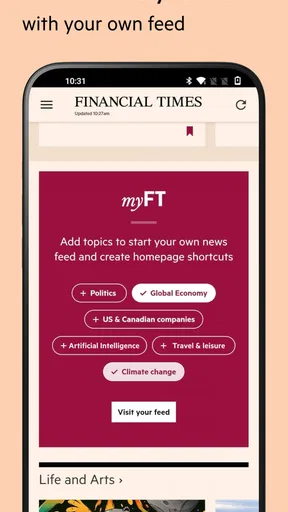
Customization is most helpful when it reflects a real information need. If I follow a particular industry for work, shaping the feed around that interest can reduce irrelevant scanning. I would still leave room for stories outside my usual lane: an economic policy change, for example, may matter to a company or profession even when it does not arrive under an obvious industry label. A tightly filtered feed saves time, but an overly narrow one can hide connections.
Worth Reading Before You Choose

Flipboard Shows What News Apps Must Do Beyond the Feed

Switching to Android Auto Means Rethinking Your Driving Routine

Google Calendar Makes a Crowded Week Easier to Manage

Ludo King Makes the Most of the Minutes Between Plans

Baby Panda World Brings Quick Play to Modern Phones, but Its Game Library Feels Busy

ESPN’s Live Game View Makes Following Close Games Easier
Small habits that make saved reading more useful
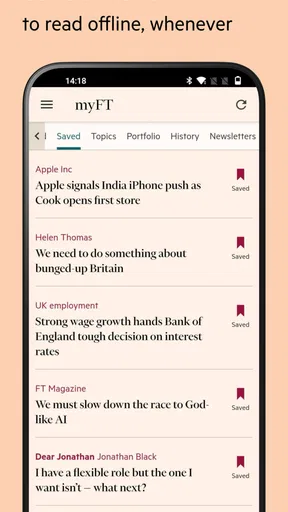
The save-for-later option works best as a short queue, not a warehouse. I save an article when I have a clear reason to return to it, then use a spare moment to read or clear it. If I bookmark every intriguing headline, the list becomes another inbox and stops helping. For longer pieces, I try to save them when I can realistically make time, rather than collecting them during a rushed scroll.
Offline reading can support that routine when a connection is unreliable, such as on a train or during travel. I would prepare the material while I still have a dependable connection instead of assuming an article will load later. That is a practical habit, not a guarantee that every part of the app will work without a network; I use offline access for reading I have set aside, not as a substitute for checking live information.
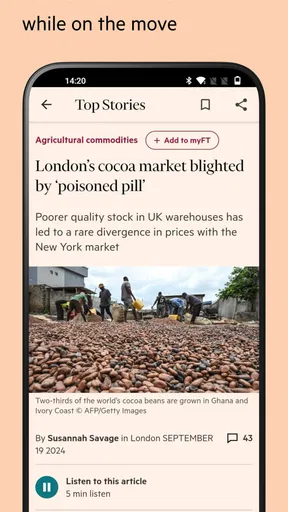
Audio and video offer another way to fit journalism into the day. I reach for them when looking at a screen is inconvenient, but I would not treat listening as interchangeable with reading every article. A spoken piece can make a commute more productive; a detailed report may be easier to revisit in text when I want to check a point or compare arguments. Choosing the format based on the task is more useful than trying to consume everything in one mode.
Where it fits among news apps
Compared with a broad headline aggregator, the Financial Times app is a better fit when I want a publication’s reporting and analysis gathered in one place. Aggregators are often more convenient for scanning many outlets quickly and comparing how different publishers frame the same event. The FT app’s stronger case is depth and continuity: I can return to coverage from a single newsroom and follow the reasoning behind a business or policy story.
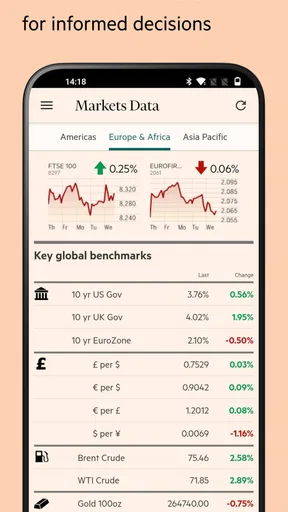
It is also different from a market-only tracker. Market information can help me see what is moving, but numbers alone do not explain what caused a change or why it matters. The app combines journalism with market-related material, which can be useful if I want both the event and some context. I would still use a dedicated financial tool when I need a specialized workflow or data-focused task; a news app is not automatically a replacement for one.
For readers who mainly want free headlines, a general news source may be the more comfortable everyday choice. The app costs nothing to install, but the publication’s subscription model means the free download should not be mistaken for unlimited access to every article. I would first decide whether I value its reporting enough to pay for continued access, then check the available subscription terms in the app before committing. The right choice depends on how often I read and whether I need this particular depth of coverage.
What the app does well—and where I would hesitate
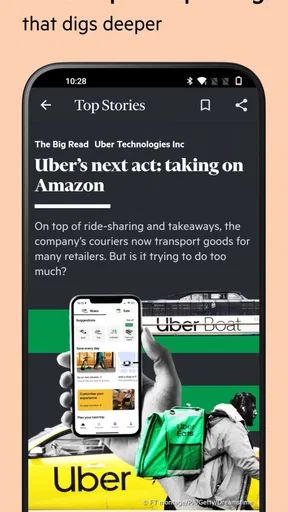
The central strength is editorial usefulness: the app is built around journalism that aims to explain developments, not simply announce them. That makes it a strong companion for people whose work touches finance, management, policy, or global business, and for students who want more than a quick summary. It can also suit a curious reader who enjoys following how decisions in one area affect another.
The trade-off is that depth takes time. If I only want a quick local update or a constant stream of short, varied headlines, this may feel like more reading than I need. Subscription access is another real consideration, particularly for someone who expects every story to be available without an ongoing cost. I would skip it if I rarely read longer articles, do not follow its subject areas, or simply prefer to get news from several free sources.
I would also avoid treating any single publication as a complete picture. Even trusted reporting reflects editorial choices about what to cover and how much space to give it. For a consequential decision, I use the app to understand the story and then compare it with primary documents, specialist sources, or other reporting where appropriate. That is not a flaw unique to this app; it is a sensible habit for serious news reading.
Who should try it, and what to check first
The app is rated for Everyone, and its audience is not limited to finance professionals. A business student could use it to follow companies and economic issues over a term; a manager might check policy or industry coverage before a discussion; and a general reader may enjoy its reporting on politics and the arts alongside financial news. Its broad subject mix is useful when someone wants to connect developments rather than keep separate apps for every topic.
Before relying on it as a regular source, I would check that my device can run it: the stated minimum operating system is version 8.0. I would also look at the current subscription choices from inside the app, since the download is free but in-app purchases are listed across a wide range, from $2.49 to $719.00 per item. Those figures are not a recommendation to buy a particular plan; they are a reason to review the exact offer and billing terms shown to me before confirming anything.
The app has been available since November 8, 2011, and its current version is 2.288.0-snapshot.35.1708068546041.13849+5773775. It has more than one million installs, with an average rating of 4.5 from around 49,000 ratings and roughly 2,500 written reviews. I take that as a sign that many readers use it, not proof that it will fit my habits. I would judge it by whether its reporting, reading tools, and access terms work for me over an ordinary week.
One question I would ask before installing is whether I need a dedicated business publication or merely a general news overview. If my answer is the latter, I may be happier with a broader free aggregator. If I want sustained reporting on finance and public affairs, the FT app has a clearer purpose. Another practical question is whether I will read on a commute or in short gaps; saved articles and offline preparation can help, but only if I build a routine around them rather than expecting the app to organize my attention automatically.
Getting Started with the App
First things first, downloading the Financial Times: Business News app is a breeze. Available on both Android and iOS, it’s designed to be user-friendly and intuitive. Once you’ve installed it, signing up is as simple as pie. You can either create an account or use social logins for quicker access. I personally went the email route, and I was all set in under two minutes.
Interface and Usability
The interface is sleek and modern, with a classy touch of sophistication that you’d expect from the Financial Times. The navigation is straightforward, allowing you to move seamlessly between sections. Whether you’re interested in global markets, technology, or the latest financial trends, everything is just a tap away.
A feature that really caught my eye was the ability to customize the news feed. You can tailor it to your interests, ensuring you get the news that matters most to you. Personally, I appreciate not having to sift through articles that aren’t relevant to my areas of interest.
Features That Stand Out
One of the standout features of the app is its offline reading capability. We all know the struggle of losing signal on the subway or during a flight. With this app, you can download articles to read later, without needing an internet connection. It’s a lifesaver for frequent travelers or those of us who are always on the move.
Another nifty feature is the ability to save articles for later. I often come across headlines that pique my interest but don’t have the time to read immediately. With the save option, I can easily bookmark these articles and revisit them when I have a moment to spare.
The app also includes a market data section, which I find invaluable. It provides real-time updates on stock markets, currencies, and commodities. For finance enthusiasts or professionals, this feature is pure gold. You can track your stocks and get insights on market trends with just a few taps.
Content Quality and Diversity
When it comes to content, the Financial Times has always been a trusted name, and the app doesn’t disappoint. The articles are well-researched, providing in-depth analysis and insights that go beyond the surface. It’s not just about delivering news; it’s about understanding the implications and providing context.
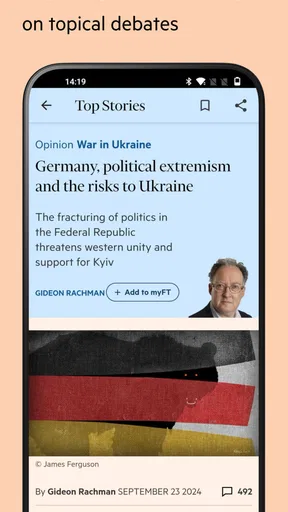
The diversity of content is another plus. From opinion pieces by industry leaders to detailed reports on economic policies, there’s something for everyone. I particularly enjoy the podcasts and videos available on the app. They offer a different perspective, and sometimes it’s nice to just listen rather than read.
Accessibility and Notifications
Accessibility is another area where the app excels. It supports various font sizes and themes, making it easier for everyone to read comfortably. Night mode is a personal favorite, especially for those late-night reading sessions.
The app also does a great job with notifications. You can customize them to get alerts on breaking news, specific topics, or even daily briefings. This way, you’re always in the loop without being overwhelmed by unnecessary notifications.
Subscription and Pricing
Now, let’s talk about the elephant in the room – the subscription. While the app is free to download, accessing premium content requires a subscription. It might seem like a downside, but considering the quality and depth of the content, it’s a worthy investment. Plus, they offer various subscription plans, so you can choose one that fits your needs and budget.
If you’re hesitant about committing, there’s a free trial option available. It’s a great way to explore the app and see if it aligns with your needs before taking the plunge.
Final Thoughts
So, is the Financial Times: Business News app worth it? In my opinion, absolutely. It’s a solid tool for anyone looking to stay ahead in the business world. With its user-friendly interface, rich content, and customizable features, it offers a comprehensive experience that’s hard to beat.
Whether you’re a finance professional, a business student, or just someone who loves staying informed, this app is a must-have. So go ahead, give it a try, and dive into the world of business news with the Financial Times.
Pros
- Comprehensive global news coverage.
- Frequent updates with breaking news.
- User-friendly interface for easy navigation.
- Customizable notifications for key topics.
- Offline reading for articles on the go.
Cons
- Requires subscription for full access.
- App can be slow on older devices.
- Some articles have paywall restrictions.
- Occasional ad interruptions in free version.
- Limited multimedia content compared to web.
FAQs for Financial Times: Business News
What features does the Financial Times app offer?
The Financial Times app provides a comprehensive suite of features designed for business professionals and news enthusiasts. Users can access the latest global news, market data, and in-depth analysis. It also offers personalized news feeds, offline reading, and push notifications to keep you updated on breaking stories. Subscribers get full access to exclusive content and the ability to save articles for later reading.
Is the Financial Times app free to use?
The Financial Times app can be downloaded for free, but access to most of its premium content requires a subscription. There are different subscription tiers available, offering various levels of access to articles, analysis, and market insights. Some free content may be available, but to fully benefit from the app’s offerings, a subscription is recommended.
Can I use the Financial Times app offline?
Yes, the Financial Times app offers an offline mode that allows users to download articles and read them without an internet connection. This feature is particularly useful for frequent travelers or those who want to stay informed while on the go. You can select specific articles or entire sections to download and access later.
How customizable is the Financial Times app?
The Financial Times app offers a high level of customization to cater to individual user preferences. You can personalize your news feed with topics and sections that interest you the most. Additionally, the app allows you to set up notifications for specific topics or breaking news, ensuring you get updates on what matters to you.
Does the Financial Times app offer customer support?
Yes, the Financial Times app provides customer support to assist with any technical issues or subscription inquiries. Users can access support through the app or the website, where they’ll find FAQs, help articles, and contact options for further assistance. Support is available to ensure a seamless user experience and address any concerns.


